The Case of the Split Dynamic Update: Why Windows 11 25H2 Upgrades Roll Back on KB5043080

Shortly after the November 10, 2026 Patch Tuesday updates went live,
mandatory Windows 11 23H2-to-25H2 media upgrades that had been running cleanly
for months started coming back from their final reboot still on 23H2 (build
22631). Worse, the software distribution tool orchestrating the
upgrade marked every one of those machines Completed with exit code
0, and SetupDiag inside a fresh diagnostic bundle
reported No Match Found. Reproducing the upgrade on a clean,
fully patched Hyper-V 23H2 test VM produced the exact same rollback.
Every affected machine failed on the same operation: adding the September
2024 Checkpoint Cumulative Update (KB5043080) from
C:\$WINDOWS.~BT\DUImageSandbox\metadata\Windows11.0-KB5043080-x64
with 0x80070057 (E_INVALIDARG) and post-reboot extend
code 0x20003 (SP_EXECUTION_SAFE_OS /
INSTALL_UPDATES). This was not a corrupt Servicing Stack Update or
a site proxy issue: an independent
Microsoft Tech Community report
from November 14, 2026 hit the identical line while upgrading to 26H2 with
Windows11UpdateAssistant.exe.
Correlating setupact.log, BlueBox.log and the
$WINDOWS.~BT directory tree, and then disassembling the published
Dynamic Update DLLs from the Microsoft Update Catalog in cdb.exe
using only stripped public PDBs from Microsoft's public symbol server
(msdl.microsoft.com), showed two separate mechanisms lining up: a
two-pass Dynamic Update scoping split on Microsoft Update
(DCAT), and a WIL feature-flag gate inside
DismApi!GetPackageListFromFolder.
Hostnames, media paths, volume GUIDs and correlation vectors in the log excerpts below are sanitized.
Two failures on the same package, and why /NoReboot returns 0
Across every failing host, setuperr.log and
setupact.log recorded the same CAddCbsPackage error
twice - first online during Pre-Finalize, and
again offline ~40-50 minutes later in SafeOS:
# Attempt 1 - Online Downlevel (Pre-Finalize):
2026-11-17 12:32:50, Info  DISM API: PID=7628 TID=8696 PackagePath 0: C:\$WINDOWS.~BT\DUImageSandbox\metadata\Windows11.0-KB5043080-x64 - DismAddPackageInternal
2026-11-17 12:32:50, Info  DISM API: PID=7628 TID=8696 PackagePath 1: C:\$WINDOWS.~BT\DUImageSandbox\Package_for_RollupFix~~amd64~~26100.9974.1.23 - DismAddPackageInternal
2026-11-17 12:32:51, Error DISM API: PID=7628 TID=872  invalid package C:\$WINDOWS.~BT\DUImageSandbox\metadata\Windows11.0-KB5043080-x64 for function GetPackageListFromFolder - GetPackageListFromFolder(hr:0x80070057)
2026-11-17 12:32:51, Error DISM API: PID=7628 TID=872  Failed to get package list in path: C:\$WINDOWS.~BT\DUImageSandbox\metadata\Windows11.0-KB5043080-x64 - CAddPackageCommandObject::GetPackageList(hr:0x80070057)
2026-11-17 12:32:51, Error SP       CAddCbsPackage::DoExecute: Failed to add package Add [2] package C:\$WINDOWS.~BT\DUImageSandbox\metadata\Windows11.0-KB5043080-x64 to C:\$WINDOWS.~BT\NewOS. Error: 0x80070057
2026-11-17 12:32:51, Info  SP       Operation can retry, we'll attempt to revert its execution.
...
2026-11-17 12:52:42, Info  SP       SERIALIZEVERBOSE: Serializing operation: Add [2] package C:\$WINDOWS.~BT\DUImageSandbox\metadata\Windows11.0-KB5043080-x64 to C:\$WINDOWS.~BT\NewOS
Two details in those seven lines explain both the false-green deployment status and the delayed rollback:
- Caller-side
DismApi.dllfails before CBS ever runs. InPre-Finalize,SetupHost.exeisPID=7628while the out-of-procDismHost.exehosting offline Servicing Stack10.0.26100.9971(KB5132688) isPID=6516. The error is thrown insidePID=7628byDismApi!GetPackageListFromFolderbefore the CBS session is ever asked to open or evaluate a package. Pre-Finalizedefers retryable package operations toSafeOS, so/NoRebootexits0x0. Because Setup was launched with/NoRebootso the management agent could schedule the restart, Setup serialized the failed operation intoSetupPlatform.ini, wrote the SafeOS BCD boot entry (Operation 108), suppressed the reboot and exitedSetupPrep.exewithProcess exit code: [0x0]inBlueBox.log. Any wrapper script that trusts$LASTEXITCODEfromSetupPrep.exe ... /NoRebootreports success before offlineSafeOShas even booted.
Once the machine restarts into SafeOS,
C:\$WINDOWS.~BT\Sources\SetupPlatform.exe restores the queue,
loads the exact same C:\$WINDOWS.~BT\Sources\DismApi.dll (not
X:\Windows\System32\DismApi.dll from winre.wim), hits
the identical GetPackageListFromFolder(hr:0x80070057) at 86-87% and
discovers it can no longer unwind Operation 108:
# Attempt 2 - Offline SafeOS:
2026-11-17 13:25:38, Info  DISM API: PID=1372 TID=1376 DismApi.dll: API Version 10.0.26100.9685 - DismInitializeInternal
2026-11-17 13:25:39, Error DISM API: PID=1372 TID=796  invalid package C:\$WINDOWS.~BT\DUImageSandbox\metadata\Windows11.0-KB5043080-x64 for function GetPackageListFromFolder - GetPackageListFromFolder(hr:0x80070057)
2026-11-17 13:25:40, Error SP       Cannot revert execution of operation 108 (Add boot entry for C:\$WINDOWS.~BT\NewOS\WINDOWS. Locale = en-US). Execution queue is now compromised.
2026-11-17 13:25:40, Error SP       ExecuteOperations: Failed execution phase Safe OS. Error: 0x80070057
Why SetupDiag reported "No Match Found"
On the test VM, a subsequent upgrade retry had already been triggered before
the diagnostic collector ran. When SetupPrep.exe starts a new run,
it archives the previous failed run from C:\$WINDOWS.~BT\Sources\Panther
and Rollback into C:\Windows\Panther\NewOs\Panther and
NewOs\Rollback. SetupDiag inspected the active,
in-progress Downlevel log in $WINDOWS.~BT instead of the completed
rollback in C:\Windows\Panther\NewOs, while
HKLM\SYSTEM\Setup\Rollback still held the real verdict
(Phase=0x2, Operation=0x3,
Internal operation=0x21, Result=0x80070057).
The two-pass Dynamic Update scoping split
Why did DUImageSandbox\metadata\Windows11.0-KB5043080-x64 fail
folder validation after November 10 when the same March 2026 25H2 media
(10.0.26200.8037) had upgraded devices with Dynamic Update for
months? Inspecting the directory listing of C:\$WINDOWS.~BT showed
what November's UpdateAgent.dll (10.0.26100.9974,
shipped with
KB5132061)
placed in that folder:
Directory of C:\$Windows.~BT\DUImageSandbox\metadata\Windows11.0-KB5043080-x64

17.11.2026  16:02            45,794 ActionList.xml
05.09.2024  23:15        14,127,865 express.psf.cix.xml
06.09.2024  02:52       113,666,182 Windows11.0-KB5043080-x64.wim
               3 File(s)    127,839,841 bytes
Earlier 2026 builds expanded KB5043080's metadata WIM into loose
update.mum and .manifest files inside that directory.
In November's 26100.9974 payload, UpdateAgent.dll
switched to the MumX container workflow
(Skipping non MumX express container Windows11.0-KB5132061-x64.wim
→ stages Windows11.0-KB5132061-x64.mumx.esd) and copied the
unexpanded Windows11.0-KB5043080-x64.wim container alongside
ActionList.xml without extracting update.mum.
Meanwhile, what version of SetupHost.exe and
DismApi.dll was trying to consume that folder? Not a November
binary, but October's
KB5127650
(10.0.26100.9685, built September 11 and released October 13,
2026). Even more interesting, Microsoft did publish a newer Setup
Dynamic Update on October 28, 2026 - KB5128977
(10.0.26100.9808) - scoped exclusively to Windows 11 25H2
and 26H2.
Reading the two DCAT acquisition passes in setupact.log side by
side shows why 25H2 (and 26H2) upgrades never received KB5128977
during Setup Dynamic Update:

SetupHost.exe's shared
26100 binary version and gets October's KB5127650
(.9685); Pass 2 queries Install.wim's
26200 version 60 seconds later and gets November's
UpdateAgent.dll (.9974) plus
SetupDUCompDB_KB5128977 - after the Setup DU phase has already
ended.# Pass 1 - DUSetupSandbox (queries Sources\SetupHost.exe PE version = 26100):
11:31:39, Info FCAcquirerDCAT: Session data [{ "ModuleID" : "SetupDynamicUpdate", "MediaVersion" : "10.0.26100.8037", "MediaBranch" : "ge_release_svc_prod1" }]
11:31:39, Info UpdateAgent Build version [10.0.26100.9711 (ge_release_svc_prod1.261009-2244)]
11:31:46, Info Verified CompDB cab: \\?\C:\$WINDOWS.~BT\DUSetupSandbox\metadata\SetupDUCompDB_KB5127650.xml.cab
11:31:46, Info Verified CompDB cab: \\?\C:\$WINDOWS.~BT\DUSetupSandbox\metadata\outer.AggregatedMetadata_KB5127648.cab
11:31:59, Info MOUPG SetupHost: Setup build version is: 10.0.26100.9685 (ge_release_svc_prod1.260910-1759)
# Pass 2 - DUImageSandbox 60s later (queries Sources\Install.wim version = 26200):
11:32:40, Info FCAcquirerDCAT: Session data [{ "ModuleID" : "ImageDynamicUpdate", "MediaVersion" : "10.0.26200.8037", "MediaBranch" : "ge_release" }]
11:32:40, Info UpdateAgent Build version [10.0.26100.9974 (ge_release_svc_prod1.261108-1239)]
11:32:49, Info Verified CompDB cab: \\?\C:\$WINDOWS.~BT\DUImageSandbox\metadata\SetupDUCompDB_KB5128977.xml.cab
11:32:50, Info Verified CompDB cab: \\?\C:\$WINDOWS.~BT\DUImageSandbox\metadata\outer.AggregatedMetadata_KB5132061.cab
11:33:06, Info Not applicable Group: Microsoft, FMID: (null), Feature: SetupDynamicUpdate_KB5128977Because Windows 11 25H2 and 26H2 are enablement-package releases built on the
26100 servicing branch, Sources\SetupHost.exe on 25H2
and 26H2 ISOs still carries file version 10.0.26100.x; only
Install.wim reports 26200.x or 26300.x.
During Pass 1 (SetupDynamicUpdate), Setup has not mounted
Install.wim yet, so it queries DCAT as 26100. That
26100 DCAT bundle remained frozen on the October 13, 2026 baseline
(KB5127648 / KB5127650) - almost certainly an artifact
of Windows 11 24H2 Home and Pro reaching End of Servicing on October 13, 2026
and subsequent D-release updates such as KB5128977 being scoped
only to 25H2 and 26H2. Sixty seconds later, Pass 2
queries 26200 and receives SetupDUCompDB_KB5128977.xml,
where ImageDynamicUpdate marks it Not applicable
because Pass 1 is already over.
Confirming the root cause in DismApi.dll with public PDBs
Every binary and symbol detail below comes strictly from public sources:
the .cab packages downloaded from the
Microsoft Update Catalog
(KB5127650 at 10.0.26100.9685 and
KB5128977 at 10.0.26100.9808) and the stripped
public PDBs served by Microsoft's public symbol server
(https://msdl.microsoft.com/download/symbols) - no private symbols
or internal source code were used.
Why WIL feature names appear in stripped public PDBs
Public Windows PDBs strip local variable names, line numbers and type
information (cdb loads them as (pdb symbols) rather
than (private pdb symbols)), but they retain decorated C++ function
names. Because the open-source
Windows Implementation Library (WIL)
instantiates function templates parameterized on a feature traits struct
(wil::details::FeatureImpl<__WilFeatureTraits_Feature_...>::__private_IsEnabled
and GetCurrentFeatureEnabledState), every feature gate's name
survives in the public symbol table, while its numeric feature ID is an
immediate constant in the disassembly. Anyone with Debugging Tools for Windows
can reproduce this directly:
cdb.exe -y "SRV*C:\Symbols*https://msdl.microsoft.com/download/symbols" -z DismApi.dll -c "lmv m DismApi; uf DismApi!GetPackageListFromFolder; q"
# KB5127650 (10.0.26100.9685) -> public DismApi.pdb GUID C6A569E048C97FABDAC0E60B02FF44611
# KB5128977 (10.0.26100.9808) -> public DismApi.pdb GUID ED8C5BE9059D0DCB6C487F1D0E1CD2A31
Surprisingly, DismApi.dll 10.0.26100.9685
already contains the code to recognize ActionList.xml
inside an unexpanded metadata folder - guarded behind a WIL feature flag named
Feature_MumXSkipContainerExpansion (ID 0x03B01358):
; DismApi.dll 10.0.26100.9685 (KB5127650) - DismApi!GetPackageListFromFolder
180076887 lea  rdx, [1800e5850h] ; L"update.mum"
180076891 call DismApi!AppendPath

180076908 lea  rcx, [DismApi!`wil::Feature<__WilFeatureTraits_Feature_MumXSkipContainerExpansion>::GetImpl'::`2'::impl]
18007690f call DismApi!wil::details::FeatureImpl<__WilFeatureTraits_Feature_MumXSkipContainerExpansion>::__private_IsEnabled
180076914 test al, al
180076916 je   1800769a2h        ; if FALSE, skip building ActionList.xml path

180076920 lea  rdx, [1800e58a0h] ; L"ActionList.xml"
18007692a call DismApi!AppendPath
When Feature_MumXSkipContainerExpansion evaluates to
TRUE, GetPackageListFromFolder accepts the directory
if update.mum or ActionList.xml exists (or if
the MSU provider claims the folder) and forwards it to
GetPackageListFromFile. When it evaluates to FALSE,
execution jumps to +0x37a, checks FileExists("update.mum")
alone, and returns 0x80070057.
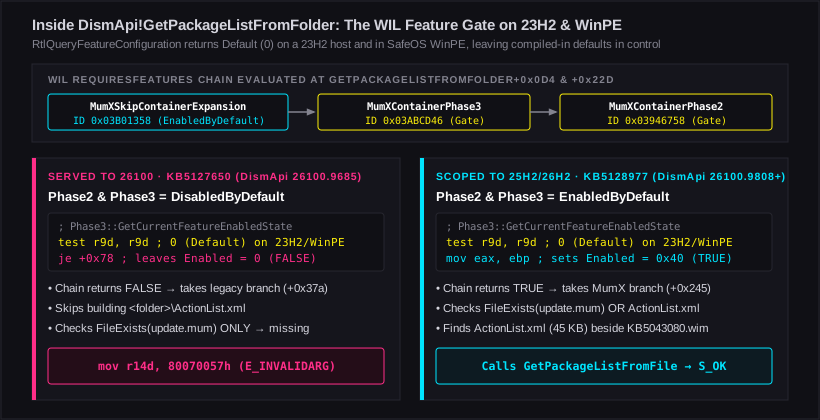
DismApi.dll.
On a 23H2 host OS and in SafeOS WinPE, no 24H2/25H2 runtime feature override
exists, so the compiled-in default on MumXContainerPhase3 and
Phase2 decides whether ActionList.xml is
recognized.Following GetCurrentFeatureEnabledState down the WIL
RequiresFeatures chain explains why .9685 always takes
the legacy branch during an upgrade from 23H2:
Feature_MumXSkipContainerExpansion(0x03B01358) is compiledEnabledByDefault, provided its required dependencyFeature_MumXContainerPhase3(0x03ABCD46) is also enabled, which in turn requiresFeature_MumXContainerPhase2(0x03946758).- In
KB5127650(DismApi.dll26100.9685, October 13), bothPhase3andPhase2are compiledDisabledByDefault(test r9d, r9d; je +0x78whenWilApi_GetFeatureEnabledState/RtlQueryFeatureConfigurationreturns0). On a running Windows 11 23H2 kernel (22631) in Downlevel - and in SafeOS WinPE - there is no 24H2/25H2 CFR feature override in the kernel feature store, sor9dis0and the chain evaluates toFALSE. (October'sUpdateAgent.dll26100.9711had the exact sameDisabledByDefaultgate, which is why October upgrades expandedKB5043080toupdate.mumand succeeded.) - In
KB5128977(DismApi.dll26100.9808, October 28) - and in November's26100.9974servicing binaries -Phase3,Phase2andContainerUsagewere all flipped toEnabledByDefault(test r9d, r9d; jne ...; mov eax, ebpwhereebp = 0x40), and the extraCBSPlan2dependency was removed.
Note why November's SafeOS Dynamic Update
(KB5132060,
26100.9968 / .9972), which did install into
winre.wim during Pre-Finalize, did not rescue SafeOS:
SetupPlatform.exe runs from C:\$WINDOWS.~BT\Sources
and loads its side-by-side C:\$WINDOWS.~BT\Sources\DismApi.dll
(.9685 from Setup DU), not X:\Windows\System32\DismApi.dll
inside WinRE.
Workarounds and trade-offs
Until Microsoft advances the 26100 Setup Dynamic Update target
on Windows Update to >= 10.0.26100.9808, four workarounds avoid
the rollback, each with distinct operational trade-offs:
| Option | How it avoids 0x80070057 |
Operational trade-offs |
|---|---|---|
1. Refresh media to the Nov 2026 25H2 ISO (26200.9974) |
Install.wim already contains KB5132061, so ImageDynamicUpdate skips downloading/staging KB5043080 and KB5132061 altogether. |
Best option during the November cycle: preserves Language Pack / FoD Dynamic Update (e.g., de-DE on top of en-US media) and cuts ~3-5 GB of download per host. Must be the Nov 2026 refresh (an Oct 2026 ISO still pulls Nov LCU via DU and fails). Re-test once December's CU ships on Dec 8 if 26100 Setup DU is still unrefreshed. |
2. Inject KB5128977 into <Media>\Sources\ |
Extracting windows11.0-kb5128977-x64.cab over the media's Sources\ folder upgrades SetupHost.exe and DismApi.dll to 10.0.26100.9808 (Phase3 = TRUE) up front. |
Keeps full Dynamic Update (LCU + SafeOS DU + Language Packs); pilot on one test client first to confirm online Pass 1 does not overwrite .9808 with KB5127650 (.9685). |
3. /DynamicUpdate NoDriversNoLCU (or NoLCU) |
Documented in Windows Setup Command-Line Options to skip LCU acquisition while keeping SafeOS DU and Language Pack / FoD acquisition. | Preserves secondary UI languages without rebuilding media; verify on a test VM that UpdateAgent 26100.9974 omits KB5043080 from DUImageSandbox\ActionList.xml, and patch KB5132061 immediately post-upgrade. |
4. /DynamicUpdate Disable |
Skips Dynamic Update and DUImageSandbox completely; upgrades straight to the WIM build. |
Deterministic, but drops secondary Language Packs and FoDs on single-language (en-US) media unless supplied via /LangPack or reinstalled post-upgrade (Microsoft Learn), and boots unpatched at the WIM baseline until first patch scan. |
Hardening /NoReboot deployment wrappers
Regardless of which media or Dynamic Update option you choose, never treat a
0 exit code from setup.exe or
SetupPrep.exe with /NoReboot as proof that an in-place
upgrade succeeded. With /NoReboot, exit code 0 only
means Downlevel staging completed and a reboot is pending; everything in
SafeOS, First Boot and OOBE still lies ahead.
- Gate compliance on the post-reboot OS build, not a pre-reboot script
breadcrumb. Check
HKLM\SOFTWARE\Microsoft\Windows NT\CurrentVersion\CurrentBuildNumber >= 26100(and for 25H2 specifically,26200or the enablement UBR) in your management tool's detection rule. If your wrapper writes a local completion marker before handing reboot control back to the agent, clear or ignore that marker wheneverCurrentBuildNumberis still below target. - Query
HKLM\SYSTEM\Setup\Rollbackto find stranded hosts. Devices that hit this defect and were marked green by their deployment tool can be isolated cleanly by filtering forCurrentBuildNumber = 22631alongsideHKLM\SYSTEM\Setup\Rollback\Result = 0x80070057(orHKLM\SYSTEM\Setup\MoSetup\Tracking\RollbackCount >= 1) before enforcing any 23H2 conditional-access or sign-in cutoffs.