Following an Azure Image Build with AIBHound

In my earlier post on building an AVD golden image with Azure Image Builder, the focus was on the recipe: the template, the customizers and the checks needed before using the resulting image. Once that recipe is running, a different set of questions takes over. Which script is executing? Has it made progress? Where did the first error appear, and what happened immediately before it?
The information is often in customization.log. Finding it,
following it while the build runs, and connecting it back to the template is
the work I wanted to make easier. The result is
AIBHound,
a Windows application for reading and monitoring Azure Image
Builder logs.
The first public release, 0.1.0, is available now. It brings live output, customizer status, timing information and error analysis into one place. The underlying log remains available when you need to check exactly what the build reported. A suspicious line is much more useful with its neighbours.

Follow the build while it is running
AIBHound can discover running Image Builder builds across the subscriptions you can access and stream the customization log as it is written. The live view follows the build's phases and displays estimated completion times. You can pause following the output to inspect an earlier section, download the log, and receive notifications when the build finishes, fails or records its first error.
There is also a view of past runs: those you have watched, together with logs still retained in the staging storage accounts. That makes it possible to return to a previous run when investigating a changed build. Availability still depends on the retained logs and your access to them.
The log reader is designed for multi-GB customization logs. It provides search with filtering or highlighting, regular expressions, severity filters, a minimap and go-to-line navigation. I would start with the reported error, then read the surrounding output before narrowing the view further. Filtering out the routine lines too early can also filter out the explanation.
Connect the output to the customizers
A template describes a sequence of customizers. A long log records what happened while that sequence ran. AIBHound matches each template customizer to its corresponding step and shows its status, duration and errors. The flame chart and script profiler provide another way to inspect where the time went.
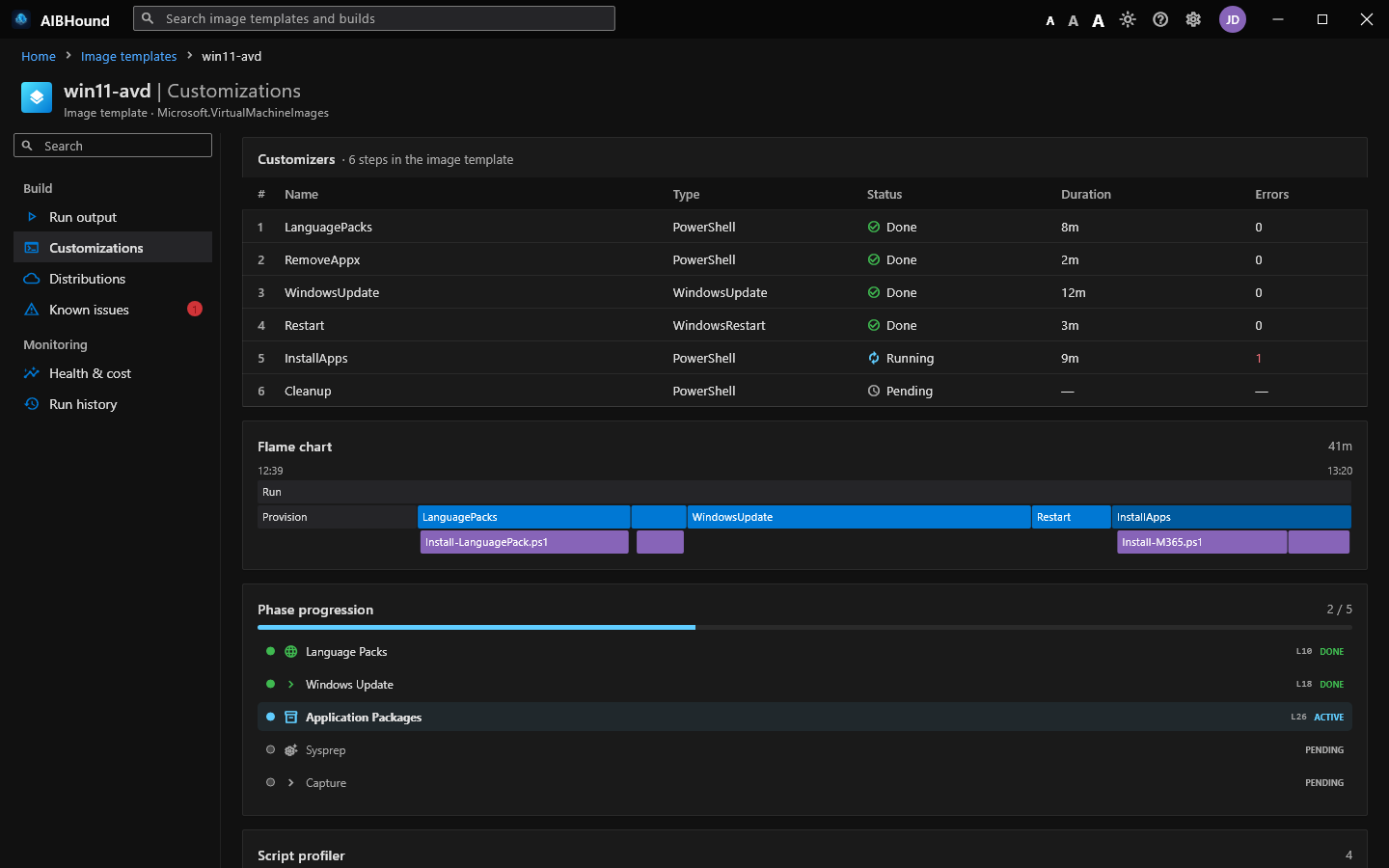
For example, the published screenshot shows InstallApps still
running with one recorded error, while Cleanup is pending. That is
a useful place to begin an investigation: inspect the application installation
output and its preceding steps. It does not establish that every line marked
as an error is fatal, or that cancelling the build is the right response.
Timing is useful for successful runs too. If one customizer accounts for much of the build, the timeline gives you a concrete step to investigate. The next question is why it took that long: a download, installation, restart or something inside the script. The chart identifies where to look; the log helps explain what happened there.
Use health and cost as investigation aids
The analysis includes an A–F health grade, grouped errors and known issues with suggested fixes. These views help draw attention to potential problems, but the grade is AIBHound's interpretation of the log. It does not validate application launches, user sign-in or the suitability of the captured image for your host pool.

The cost view uses Azure's public pay-as-you-go pricing to produce an estimate. Treat it as an indication of build cost, rather than a billing statement or a quote. Your actual charges and commercial agreement remain separate. Likewise, an ETA is an estimate, not a promise that the next installer will finish on schedule.
When a known issue matches, read the suggested fix alongside the actual error and your template. Microsoft's Image Builder troubleshooting guidance is another useful reference. Template submission failures and failures during the build have different evidence; a customization log cannot explain a build that never reached customization.
Getting started
AIBHound requires Windows 10 or 11, x64. There is no installer:
- Download the ZIP and its checksum from the official release page.
- Check the ZIP's SHA-256 against the published checksum.
- Extract the archive and run
AIBHound\aibhound.exe. - Sign in through the browser with the Microsoft Entra ID account that has access to the resources you want to inspect.
For the initial release, the checksum command is:
Get-FileHash .\AIBHound-0.1.0-windows-x64.zip -Algorithm SHA256Compare the returned hash with the value on the
0.1.0
release page or in its .sha256 file. This release is not
code-signed, so Windows SmartScreen may display a warning on first launch.
Review the download and your organization's application policy before running it.
Give it the access the task needs
AIBHound signs in as you and operates with your Azure permissions. The documented role requirements distinguish resource discovery, log downloads and build cancellation:
| Task | Documented role and scope |
|---|---|
| Discover builds, follow live logs and read template status | Reader on the subscriptions or resource groups |
Download customization.log and access past runs | Storage Blob Data Reader on the IT_* staging storage account |
| Cancel a run | Contributor on the image template |
Resource Reader and blob data access serve different purposes. Being able to see a template does not mean you can download every retained log. Cancellation is an explicit action against the running build and needs its own permission; it is separate from pausing the live log view.
Browser sign-in uses OAuth 2.0 with PKCE, with the Azure PowerShell public client by default. You can supply your own app registration on the sign-in screen. According to the published documentation, access tokens stay in memory, the refresh token is held in Windows Credential Manager, and signing out removes it.
Keep the logs with the investigation
Settings, saved runs and cached logs are stored locally under
%APPDATA%\AIBHound\aibhound. Cached logs are deleted after
seven days by default; the retention setting is under
Settings → Data & storage. Preserve the relevant log
separately if you need it for a longer investigation.
A local cache can still contain sensitive information. A script that prints a secret puts that secret into the build log too. Review logs before sharing them. For feedback, the application provides an in-app manual through the ? button and a scrubbed diagnostics log. Include the version and reproduction steps in a bug report, without attaching tokens or unreviewed build output.
AIBHound is free to use for personal and business purposes under its license. The public repository hosts releases and documentation, rather than the application source. It is an independent tool and is not affiliated with or endorsed by Microsoft.
My aim with AIBHound is to make it easier to follow an image build and explain what happened inside it. If you are already maintaining an AIB recipe, try it alongside your next run and compare the customizer timeline with the raw output. I would be interested in the cases where that connection helps, and the ones where the viewer still leaves you searching.
The release page has the current download.